
Ready to Launch!
Once all pre-launch checks have been completed, we are ready to launch the new website. There is a different process to follow depending on where the new website will be hosted.
- Hosted in our WP Engine Server
- Hosted on client’s own hosting (cPanel)
- Hosted on Amazon Web Server (AWS)
Hosted with WP Engine
If the client’s new website will be hosted with WP Engine, watch this video or follow the steps below for launch:
- Take a backup of the existing website (if applicable) in the Production Environment and use the description “Backup of old website checkpoint”. This backup is important should we need to roll back the site after launching the new website.
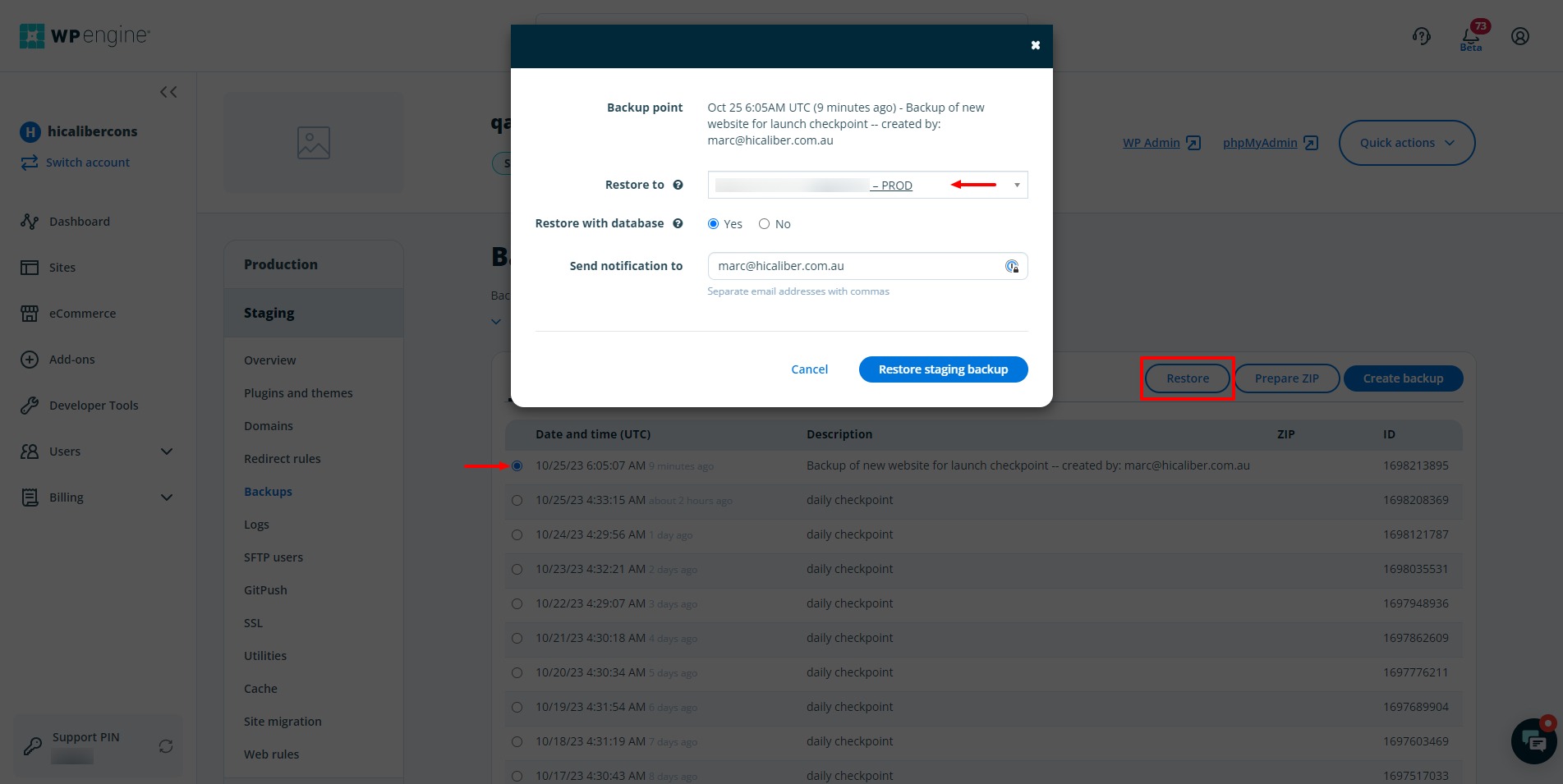
- Take a backup of the new website assuming this was developed in Staging or Development Environment. Use the description “Backup of new website for launch checkpoint”.
- Once the backup above is complete, the next step is to use replace the Production Environment with the backup you have just taken of the Staging Environment. We use the Restore option for this, see screenshot below.
Hosted on client’s own cPanel
If the client’s new website will be hosted in their own cPanel Account, please follow the steps below:
- Take a backup of the new website assuming this was developed in Staging or Development Environment. Use the description “Backup of new website for launch checkpoint”.
- Once the backup above is complete, export the files and upload to the client’s cPanel account.